How do I disable/re-enable my phone?
Do-Not-Disturb Method
Section titled “Do-Not-Disturb Method”This approach stops incoming calls across all your devices. Note that you can still make outbound calls, but cannot receive any on the disabled device.
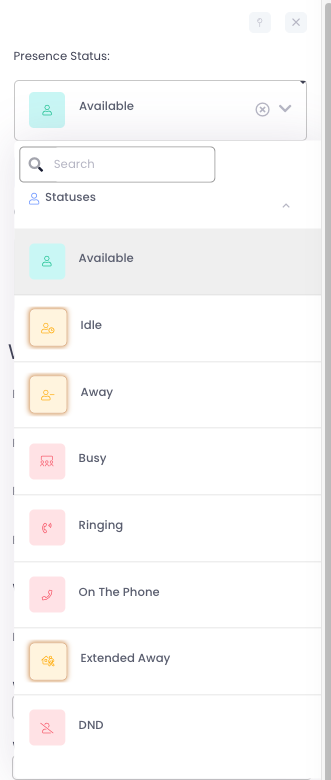
- On desktop or mobile, open the AvidBit app and select your initials (top right)
- From the ‘Presence Status’ dropdown, choose DND
- To re-enable, change ‘Presence Status’ to Available
Do-Not-Disturb Desk Phone
Section titled “Do-Not-Disturb Desk Phone”To block calls on just your desk phone while keeping other devices active, use this alternative method. This won’t work if your organization has “Unifi DND Presence ON/OFF” enabled - that setting applies DND across all devices.
- Locate the DND button on your phone (check labels or swipe down on touch screens)
- When activated, a DND symbol appears at the top of your display
- Press again to disable DND

Find Me / Follow Me Method
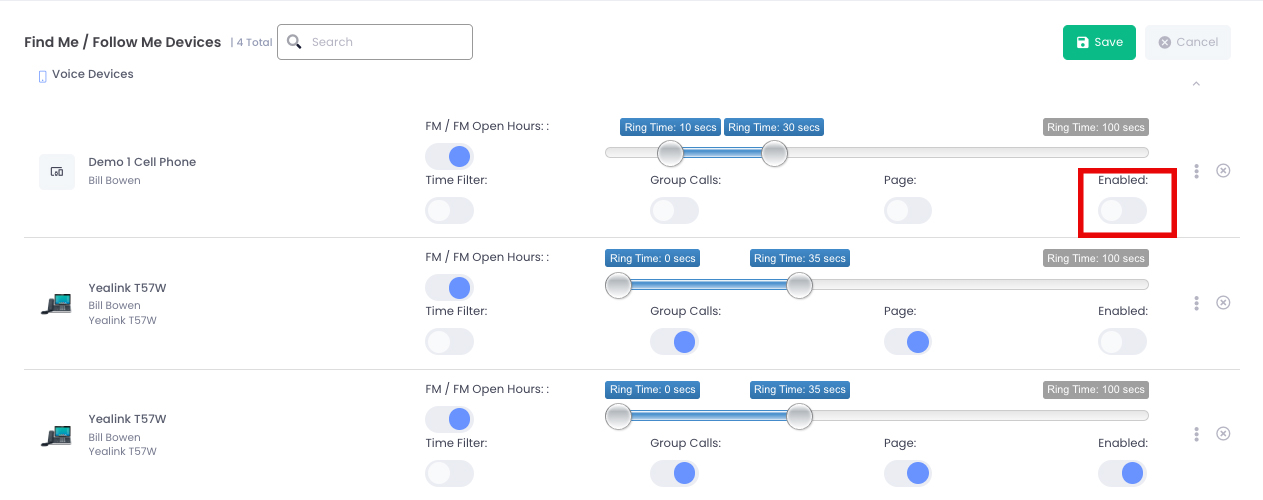
Section titled “Find Me / Follow Me Method”This centralized option lets you enable/disable individual devices while keeping others active. Availability depends on your user permissions.
- Select your initials (top right)
- Scroll down and click My User Settings3. ClickEdit in the ‘Find Me / Follow Me Devices’ section
- Toggle each device ON/OFF as needed
- Press the green Save button