

Managing Ring Groups
Creating a Ring Group
Section titled “Creating a Ring Group”To set up ring groups:
- Navigate to Settings from the top toolbar
- Select Ring Groupsunder theVoice category
- Click the blue + Add button
- Enter a name and assign the ring group to a user
- Customize your preferred options
Distribution Methods
Section titled “Distribution Methods”The system offers several ways to route calls:
- All at once: Every member rings simultaneously (default)
- Ordered By Priority: Rings members sequentially based on list order
- Random: Calls route randomly to members
- Least Called Today: Prioritizes members with fewer calls received
- Round Robin: Distributes calls evenly across members in sequence
Note: “No Busy” variants exclude members currently on calls or being rung.
Group Ring Types
Section titled “Group Ring Types”- Ring Group: Standard setting where phones ring and await answers
- Page Group: Broadcasts announcements through phone speakers
- Conference Page Group: Allows multiple participants to join and speak
- Ring Group Pickup: All members ring for ~30 seconds; answering members bridge together
Additional Settings
Section titled “Additional Settings”Caller ID Customization: Prepend or append text to caller information (e.g., “Sales - Bob Dylan”). You can also override caller ID entirely to indicate call type.Call Handling: Configure voicemail behavior, missed call notifications, retry logic, and member rejection permissions.
Configuring Members
Section titled “Configuring Members”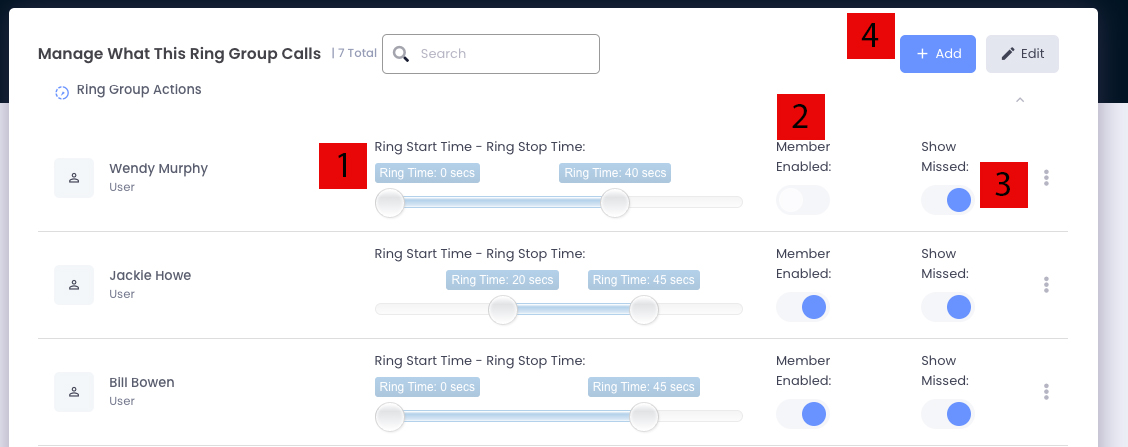
- Adjust ringing schedules using the slider for start/end times
- Toggle “Member Enabled” to activate or deactivate member participation
- Enable “Show Missed” notifications for unanswered group calls
- Click + Add to add new members
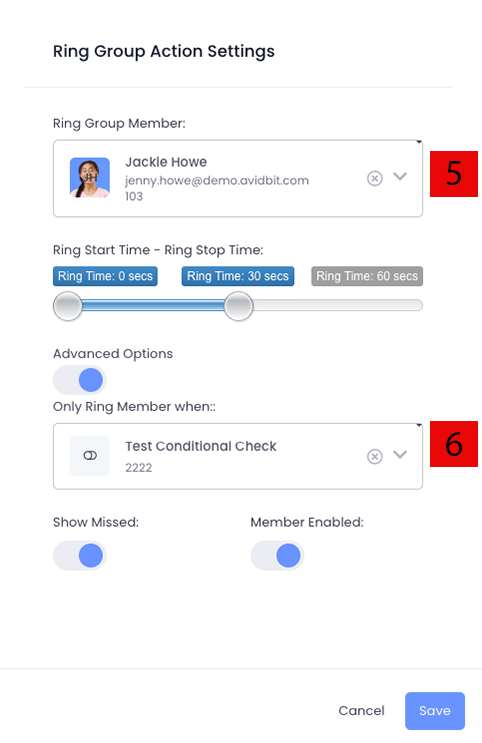
Members can be configured with conditional logic using toggles created in Settings → Toggles.