

Navigating the Inbox
Overview
Section titled “Overview”While the Communicator app groups messages by conversation, “the Inbox App allows you to see all communications to a specific inbox rather than grouped by conversation.” Access this feature through the top toolbar by selecting Apps → Inbox.
Key Features
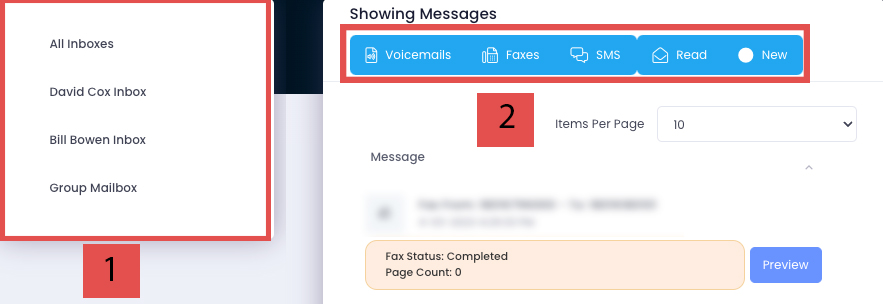
Section titled “Key Features”The interface includes two primary components:
-
Inbox Switcher - Toggle between multiple inboxes if your account has more than one configured.
-
Message Filters - Blue filters indicate active message types. Click a blue filter to deactivate it and hide those messages:
- Voicemails (RED) - Includes transcription and audio playback button when enabled
- Faxes (ORANGE) - Shows completion status, page count, and a ‘Preview’ button to download files
- SMS (GREEN) - Click the blue ‘Conversation’ button to access the full conversation thread in Communicator