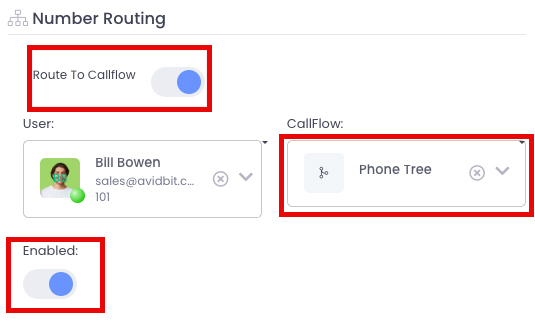
How do I assign a number to a CallFlow?
Steps to Assign a Number to a CallFlow
Section titled “Steps to Assign a Number to a CallFlow”- Navigate to Settings from the top toolbar
- Under the Voicecategory, selectNumbers
- Choose the number you want to configure
- Confirm you’re viewing the ‘Number Info’ pane
- Click the edit button (pencil and paper icon) in the upper right
- Enable the “Route To Callflow” toggle
- Use the CallFlow dropdown to select your desired call flow
- Verify the number has Enabled status
- Click Save
Key Details
Section titled “Key Details”The call flow determines “who gets rung, when phones can ring, what to do if no one answers, etc.” This ensures that incoming calls are properly directed according to your business needs.