How do I Add/Remove an inbox?
To create an inbox:
- Select Settings from the top toolbar
- Under the Voicecategory, chooseInboxes3. Click the greenAdd Inbox button in the upper right
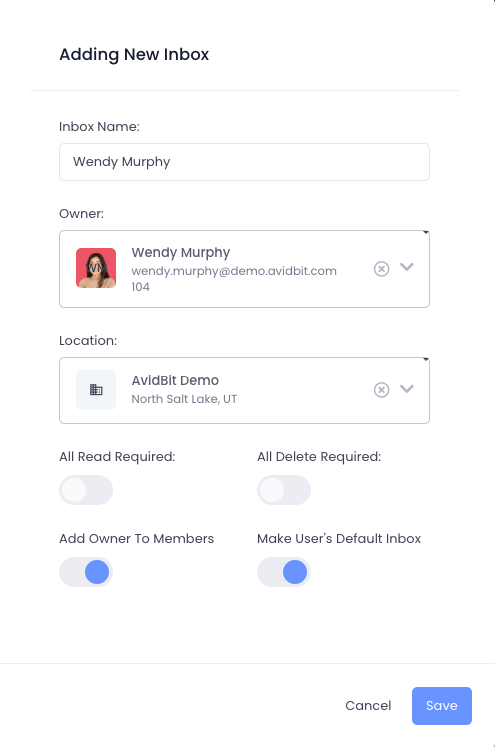
- Enter a descriptive name for the inbox
- Assign an owner from the dropdown menu (required for every inbox)
- If “Add Owner To Members” is toggled ON, you’ll see a “Make User’s Default Inbox” option. Enable it to add the user and set it as their default; skip this for shared group inboxes
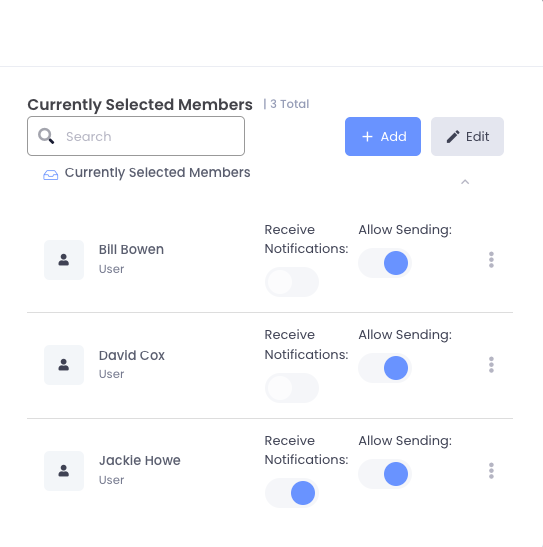
- Click Save8. Once created, select your new inbox and click**+Add** under “Currently Selected Members” to add more users, configure notifications, and enable Caller ID features
Remove
Section titled “Remove”To delete an inbox:
- Go to Settings → Voice → Inboxes
- Locate the inbox to remove
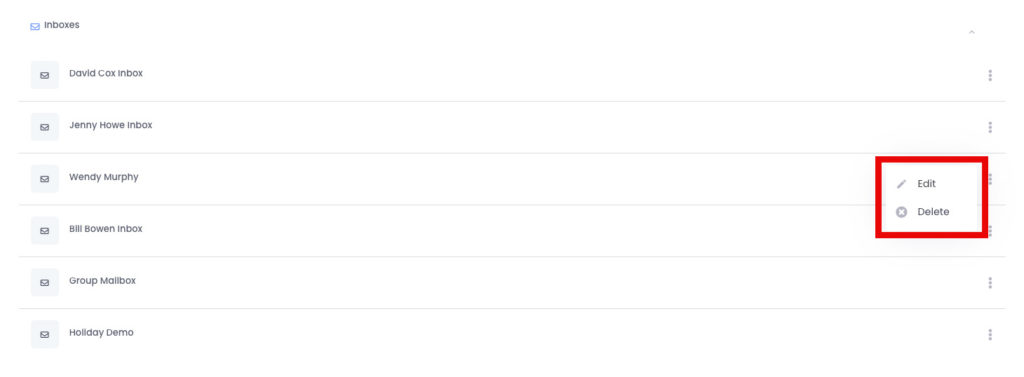
- Click the three-dot menu on the right side of the inbox name
- Select Delete5. Confirm by clickingOK in the dialog box
You can also remove individual members from an inbox by accessing “Currently Selected Members,” clicking the three-dot menu next to a member’s name, and selecting Delete.