How to set up push notifications
Installing iOS 16.4
Section titled “Installing iOS 16.4”iOS 16.4 and newer is required for push notifications to function. To install this version:
- Navigate to Settings on your iPhone
- Press General3. PressSoftware Update4. PressDownload and Install to install 16.4
AvidBit App Settings
Section titled “AvidBit App Settings”Once your device runs the required iOS version, configure the app itself:
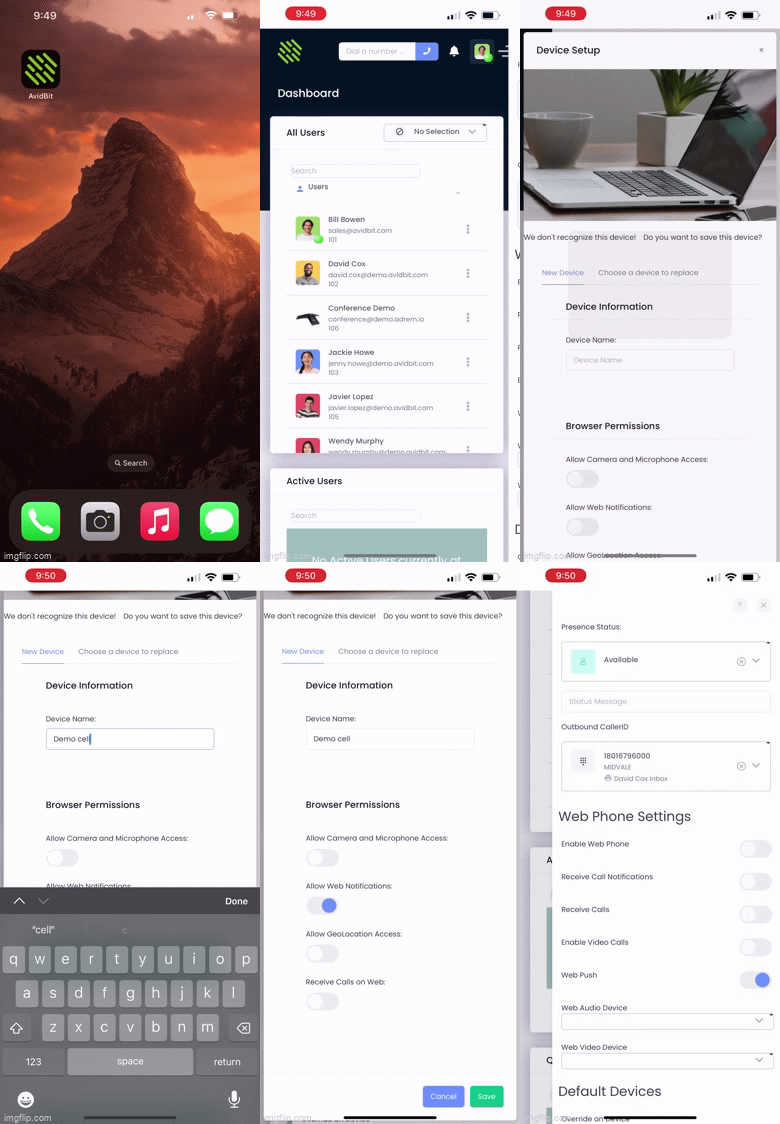
- Navigate to the AvidBit App on your phone
- In the upper right corner select your initials
- Under “Web Phone Settings” toggle ON Web Push4. PressAllow on “AvidBit would like to send you notifications”
- In the Device Setup screen, set the Device Name as Your Name + Cell (e.g. John Cell)
- Toggle ON Allow Web Notifications
- To verify setup completion, exit the app, re-enter it, click on your initials again and confirm that “Web Push” remains toggled ON